

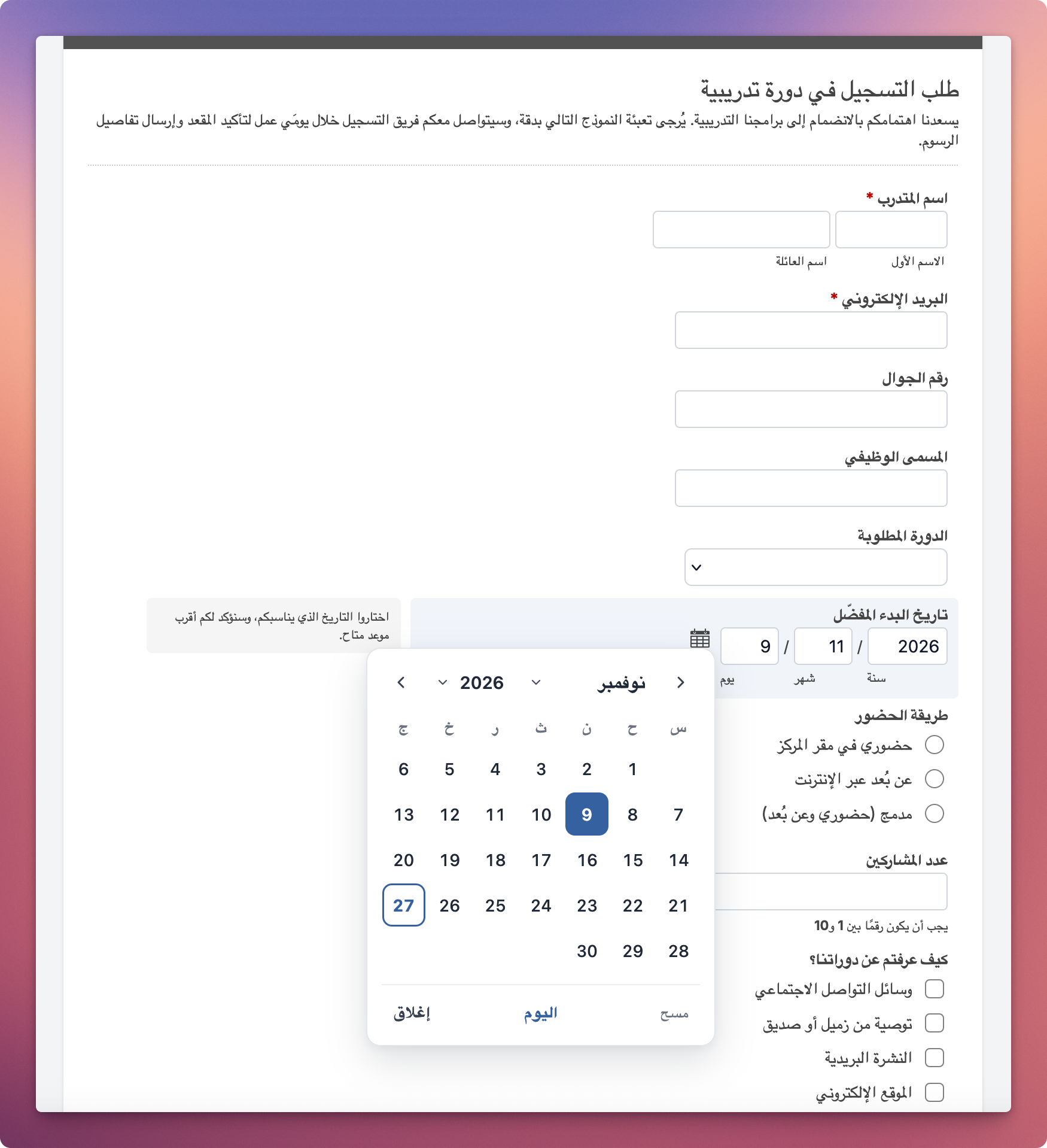
MachForm can show a form in Arabic, written right to left. Choose Arabic as the form's language and the whole form turns round: labels sit on the right, fields and choices fill from the right, the buttons, calendars, review page, success page, emails and PDFs all read right to left. Everything MachForm writes for respondents (error messages, the calendar, the review page, payment pages) is in Arabic.
Numbers, dates, times, prices, email addresses and phone numbers stay left to right, as they are written in Arabic everywhere.
Choose Arabic
Open your form in the form builder.
Click Form Properties, and in General choose Arabic under Language.
Click Save Form.
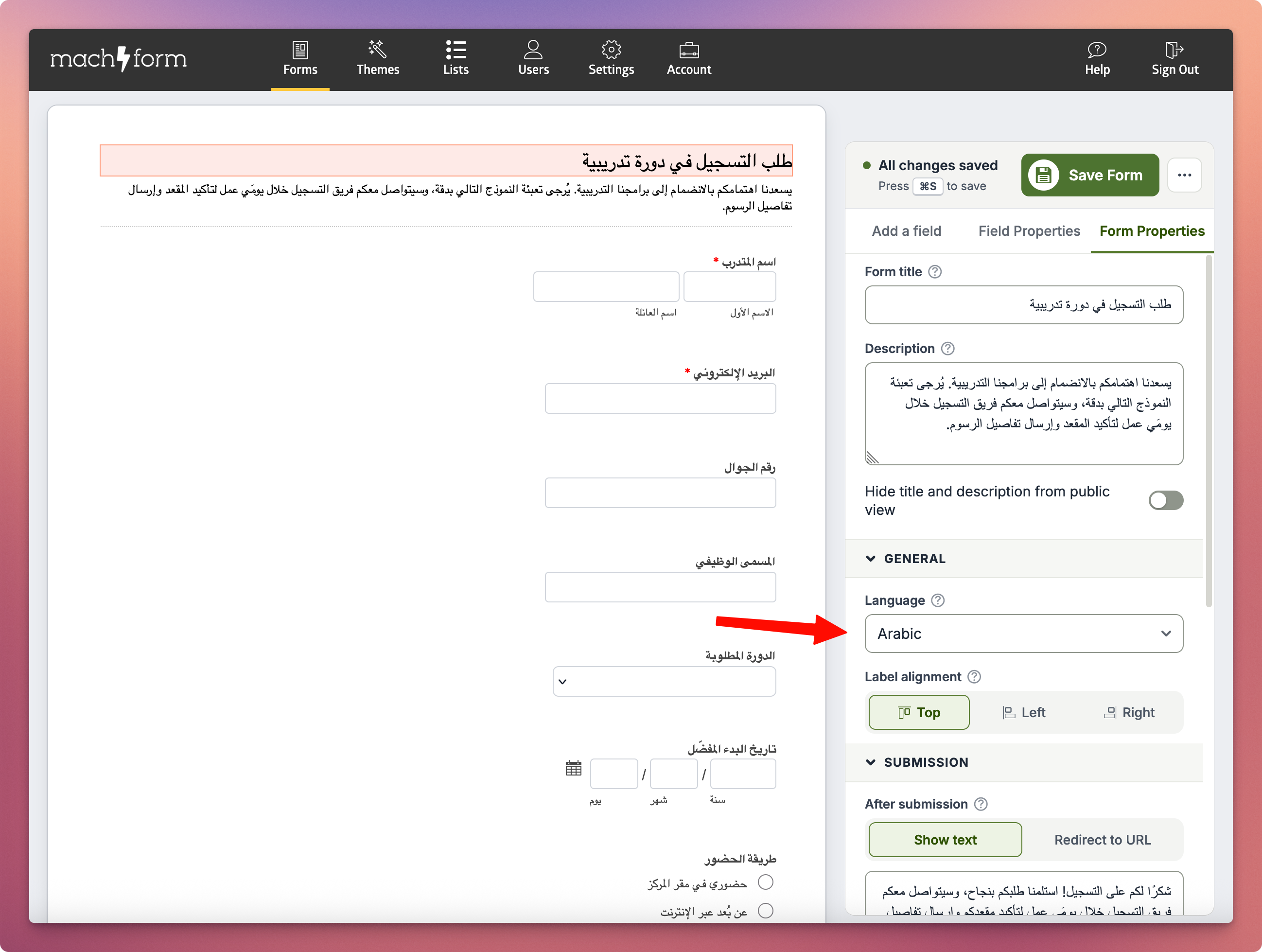
The preview in the builder turns right to left as soon as you choose Arabic, so you see the form as respondents will. The builder itself (its panels, menus and settings) stays in English, left to right.
The form's direction follows its language. There's no separate setting for it: an Arabic form is always right to left, and every other language is left to right.
What turns round, and what doesn't
Turns right to left:
field labels, descriptions, instructions and error messages, with labels on the right (or beside the field, on the right, when labels are Left or Right Aligned);
choices: the radio button or checkbox on the right of its text, and columns of choices filling from the right;
name and address parts, from the right;
the buttons: Submit on the right, Previous to its left;
the steps at the top of a multi-page form, and the progress bar, which fills from the right;
the review page (labels on the right of the answers), the success page, the payment page, and the pages shown when a form is closed, full or protected by a password;
the calendars of the Date, Date Range and Appointment fields: the month starts on the right, the week starts on Saturday, and the arrow keys follow the layout (the left arrow moves to the next day);
emails and PDFs.
Stays left to right, in its usual order, and sits on the right of the form:
the boxes of a date (in the order of the field's date format), a time, a US phone number, a price, a card number and its expiry date;
the Email, Website, Number and Phone boxes, where respondents type left to right, starting at the right edge of the box.
Digits on the form are the 0 to 9 digits used across MachForm.
Translate the texts you write
MachForm translates its own words. The texts you write in the builder are shown as you typed them, so write them in Arabic:
the form title and description;
field labels, instructions, choices and default values, including the texts some fields start with in English: a Matrix field's title and its "Answer" columns, and the Signature field's note ("I understand this is a legal representation of my signature.");
button texts: Submit in Form Properties, and Continue and Previous on each page break (they start in English);
the review page: its title, description and buttons;
the success message (Form Properties, After submission) and the message shown when the form is closed;
emails: the subject and content of each notification email and auto-reply you send.
The label box and the other text boxes in the builder follow what you type: Arabic reads right to left while you type it, English left to right.
Spam protection
The Simple Text CAPTCHA asks its questions in English. For an Arabic form, choose another type in Form Properties > Protection > CAPTCHA type:
reCAPTCHA V2 and ALTCHA show their own words in Arabic;
Simple Image shows letters to type, with the instructions in Arabic.
Arabic keyboards
Respondents using an Arabic keyboard may type the Arabic digits ٠١٢٣٤٥٦٧٨٩ (or the Persian ۰۱۲۳۴۵۶۷۸۹). In boxes that hold numbers (the Number, Price, Phone, Date and Time boxes), MachForm changes them to 0 to 9 as they're typed, and again when the form is sent, so the number is checked and saved like any other. Text fields keep exactly what was typed.
Emails
Emails of an Arabic form read right to left: notification emails, auto-replies, save-and-resume emails and one-time codes. In the entry table ({entry_data}), labels sit on the right and each answer reads in its own direction, so an email address or a number reads left to right. Dates of Date fields and the payment date are written in Arabic. Plain-text emails carry marks that keep each line right to left in mail apps.
PDFs
The entry PDF and the PDF attached to emails read right to left, with labels on the right, and Arabic letters joined as they should be. A few limits, which come from how PDFs are drawn:
A PDF with Arabic text is drawn in one font, DejaVu Sans, whatever font your PDF template names.
There are no italic Arabic letters: italic text is drawn upright.
Marks above and below letters (shadda, fatha, kasra and the others) sit where the font puts them, so a mark can touch a tall letter such as lam or alef.
Lam-alef is the only pair of letters drawn as one joined shape.
A price or a phone number typed inside an Arabic sentence follows the order a web browser gives it:
$250.00shows as250.00$. In the entry list these values are on their own lines and read left to right.Japanese, Chinese and Korean text isn't drawn in a PDF that also has Arabic.
Signatures
When a respondent types their name in a Signature field, an Arabic name is drawn joined and right to left, in an Arabic handwriting-style font (Amiri). Names longer than 75 characters are cut, as for every language. Drawn signatures work as on any form.
Your entries
The admin pages (Entries, the entry view, Edit Entry, the entry log) stay in English, left to right. Each answer and each field label reads in its own direction, so Arabic answers read right to left and English ones left to right, in the same table. This works for every form, so an English form with an answer in Arabic shows it correctly too.
When you edit an entry of an Arabic form, the text boxes follow what's typed in them. Exports to Excel and CSV are unchanged: Excel shows each cell in its own direction.
Embedding
All three ways of embedding a form (iframe, JavaScript and PHP code) show an Arabic form right to left, on English and Arabic websites alike. With the PHP code, the form turns round inside its own box and leaves the rest of your page as it is.
FAQ
Can I have an Arabic form that reads left to right?
No. The direction follows the language. Choose Arabic for a right-to-left form.
Can my Arabic form have English labels or answers?
Yes. Each label and each answer reads in its own direction, on the form, in emails and on your entry pages.
Why are the digits 0 to 9 and not Arabic digits?
The 0 to 9 digits read the same everywhere and are what payment providers, spreadsheets and other systems expect. Respondents can still type Arabic digits; MachForm changes them in number boxes.
The success page shows my message in English.
The success message is a text you write. Change it in Form Properties, under After submission, with Show text chosen.
My Continue and Previous buttons are in English.
They're texts you write on each page break. Select the page break in the builder and type them in Arabic.
Is Hebrew, Persian or Urdu available?
Not yet: Arabic is the right-to-left language available today. Answers typed in Hebrew, Persian or Urdu on any form read right to left on your entry pages.